











Exclusive research for Social Care Today assessed 750 UK care provider websites from the perspective of a family with failing eyesight. Just 578 were reachable and only 19 passed every automated accessibility check.
 This article was written by Len Burges, founder of TRG Digital and the research was conducted in September 2026
Almost every conversation about accessibility in social care is about buildings, handrails, contrast on a door frame, signage a resident with dementia can follow. Very little of it is about the website, which is where the family starts, usually at night, usually on a phone, and often on behalf of someone whose sight, hands or patience are not what they were.
So we measured it. We took 750 care provider websites at random from a directory of the UK sector, stratified across nursing homes, residential homes and home care, and across every region.
We read each one the way a search engine does, then opened it in a real browser at phone and desktop size and measured what a visitor actually meets: the contrast of the text, the size of the tap targets, whether images carry descriptions, whether the enquiry form can be understood by a screen reader.
The single biggest barrier is text nobody can read
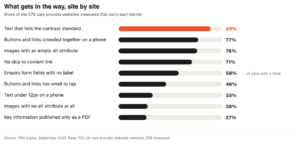
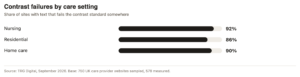
89% of sites had text somewhere that fails the contrast standard, meaning the difference between the writing and the background it sits on is too small for the threshold set by the international accessibility guidelines. Across every page we rendered, 25% of the individual pieces of text we sampled failed.
Pale grey on white is the fashion, and it has been for a decade. It looks restrained on a designer’s monitor in a dim room. It disappears on a six year old phone held at arm’s length in a hospital corridor by somebody in their seventies who is trying to work out whether this home takes nursing residents.
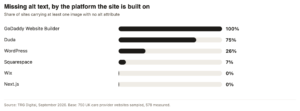
“Providers on the same web platform fail in the same way. This is not four hundred separate decisions. It is a handful of defaults, repeated.”
Most of this is inherited, not chosen
The alt text numbers show what is really going on. An alt attribute is the short description a screen reader speaks aloud in place of an image. 28% of sites had at least one image with no alt attribute at all. A larger group, 76%, had images carrying an empty one, which tells assistive software to skip the image entirely.
Empty alt attributes are correct for decoration. At the volumes we found, they are not decoration. They are a theme or a page builder filling the field automatically, which means the photograph of the garden, the staff portrait, the award badge and the CQC rating are all silent.
The forms where enquiries arrive
Of the sites carrying an enquiry form, 58% had form fields with no label attached to them in the markup. A sighted visitor sees a box with the word ‘Name’ next to it. A screen reader user hears ‘edit text’, and has to guess.
This is the part that costs providers money rather than merely goodwill. Everything else on this list affects whether a family can read the site. This affects whether they can contact you.
The phone problem
77% of sites had tap targets crowded together, and 46% had buttons or links smaller than the recommended minimum. 33% set text below 12 pixels somewhere on the page. Combine those with a tremor, arthritic hands, or simply a large thumb, and the ‘Enquire’ button becomes a lottery.
What the widgets do not fix
17 of the 578 sites were running an accessibility toolbar or a listen to page tool. Every one of those 17 sites still failed at least one of the basic checks above.
That is a small sample and it should be read as an illustration rather than a statistic. But it matches what accessibility specialists have been saying for years: a widget sits on top of a page, it does not change the markup underneath. If the image has no description, the toolbar has nothing to read out. Most screen reader users arrive with their own software and never touch the widget at all.
Before you trust a free accessibility score
We went into this expecting to find that automated checkers routinely measure nothing, because on sites built entirely in JavaScript the scanner downloads an empty shell. In this sector that turns out to be rare: only 2% of the sites we compared gained meaningful content once the browser had run. Care websites are mostly built on WordPress and served whole.
The warning still stands, for a simpler reason. Automated testing of any kind catches perhaps a third of real accessibility barriers. Everything in this article is machine measurable. Whether your content can be understood by somebody with dementia, whether your booking process can be completed by keyboard alone, whether your video has captions worth having: none of that is in these numbers. A green score is a floor, not a verdict.
One in five sites could not be read at all
Before any of the above, 23% of the addresses we held could not be reached at all: domains with nothing answering, servers returning errors, and 4% of every site attempted showing a certificate warning, which is a browser telling a family the site may not be safe before they have read a word of it. We checked each failure twice, on separate days, and verified a sample by hand, because a directory entry going stale is not the same as a provider having no website.
What to do about it, in order
- Check your contrast. Free browser tools will tell you in a minute. The usual culprit is pale grey body text and pale text over photographs
- Fix the enquiry form. Every field needs a real label tied to it, not just placeholder text that vanishes when typing starts
- Write alt text for anything that carries meaning, starting with your CQC rating, your awards and your staff photographs
- Open your own site on an old phone, in daylight, and try to make an enquiry with one thumb
- Ask your web supplier which of these their platform does by default. If the answer is a shrug, the defaults are probably costing you
Method, and what these numbers do not say
Sample. 750 distinct provider websites drawn at random from a UK care directory, stratified by care setting and region. The unit is the website, not the location, because a group runs one site across many homes. 578 were reachable and measured; 578 were also opened in a real browser at 390px and 1280px wide. Measured. Contrast against the WCAG AA thresholds, text size, tap target size and spacing, images without alt attributes, form fields without labels, mobile viewport, page language, PDFs, certificate validity, and the presence of accessibility toolbars. Every check is automated and was run identically on every site.
Measured. Contrast against the WCAG AA thresholds, text size, tap target size and spacing, images without alt attributes, form fields without labels, mobile viewport, page language, PDFs, certificate validity, and the presence of accessibility toolbars. Every check is automated and was run identically on every site.
Limits. This studies providers that have a website, and says nothing about those that do not. Automated tests catch a minority of real accessibility barriers, so these figures are a floor rather than a verdict, and no site here is described as inaccessible. Sites were sampled, not exhaustively crawled: we read up to six pages each, so a fault on a page we did not visit is not counted. Percentages carry a margin of roughly four points. No provider is named, because the point is the pattern.
Interests. TRG Digital builds websites and digital tools for UK care providers, and sells a listen to page tool among other things, so we have a commercial interest in this subject and in the toolbar finding in particular. The full method and the aggregate data are published at trgdigital.co.uk so anyone can check the work.
Images: Len Burges and Shutterstock
Other features:
‘She inspired people, she energised people’: remembering Dame Esther Rantzen
‘They need politicians to advocate for them’: Will Quince on the Babies Bill
Leave a Reply